
Solutions

Cover the entire customer journey

Pick the AI pattern that fits where your customers actually need help — from public discovery to internal team co-pilots.

Acquisition

Increase conversion rates and reduce the amount of incoming support tickets.

Retention and upsells

Improve retention, supercharge sales expansion, and deflect support tickets.

Self-service support

Offer your customers 24/7 support, in websites or client portal.

Co-pilot for support teams

Reduce support ticket handling time in customer support teams.

Features

One-stop-shop for your AI solution

Everything you need to ship AI in production — from no-code components to enterprise governance, all on one compliant foundation.

Agentic AI

Combine AI assistance, semantic search, and agentic tasks for 24/7 support.

No-code management

Easy UI integration with 20+ templates, automated AI training, and clear insights.

Integrates anywhere

Unlock your existing business systems with any of our 50+ connectors.

Privacy and security

Benefit from enterprise-grade privacy protection for European sectors.

Customers

Trusted by leaders

How regulated-Europe brands — from Visma to Onguard — turned customer success into a revenue engine with Unless.

Visma Enterprise AS

Norway's leading ERP — modernized self-service with Unless.

Helping patients

After Zorgdomein deployed Unless, patient self-service surged within weeks.

Enhancing credit software

Financial service Onguard powers their support operations with Unless.

Ticket deflection at scale

Meet Sally, Kontek’s AI support colleague in a complex regulatory landscape.

Resources

Resources and support

Documentation, articles, and recipes for getting the most out of your Unless deployment — plus a help desk when you need a human.

Help center

Read how to get started of find advanced guides to help you using our platform.

Security and compliance

Privacy protection measures, security by design, and compliance guidelines.

Developer documentation

Find reference documentation for the javascript API.

The Unless cookbook

Bite-sized implementation examples for every stage of the customer lifecycle.

Pricing

Subscription plans

Transparent plans for every team size — start with a free pilot, scale to enterprise with a phased implementation plan.

High level plan overview

Our subscription plans cover your entire user journey with three use cases.

Additional services

We offer premium support, custom development and integrations.

Compare plans

Choose the right subscription plan with this feature comparison table.

Frequently asked questions

Check out the list of what others asked our sales reps.

Article

How to add topics to training data

Organizing your training sources into topics helps avoid conflicts. Answers will be generated using the sources of one topic at a time.

Updated 25 February 2025

When adding training data, you often start with global training sources. These sources will then be used to answer questions across the board. However, it's possible that you also want to make use of topics when uploading training sources that relate to different products, internal vs. external use cases, etc.
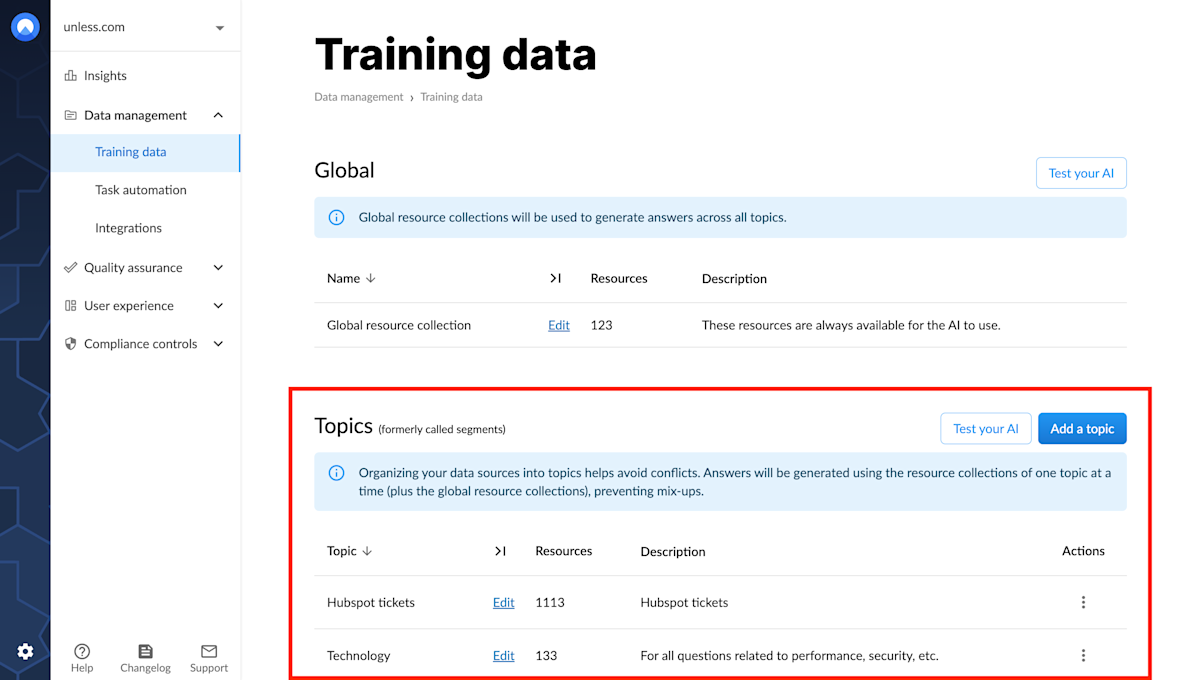
Training data: Topics

When to use topics

Let’s take a look at some use cases. You might be working at a company with three completely different products. Uploading the related training sources all in one place could result in conflicting information. For example, if the products have different pricing structures or if one offers a free trial but the other two don’t, etc.

It can also be important to segment different users if they are supposed to have access to different (levels of) information. Examples could include your customer support team using the AI to answer support tickets vs. the end customers using the AI directly to receive answers to their questions. If you are a software service provider in the education sector, the information and support you provide to teachers and students will vary greatly.

Take note: In each topic, the AI will also search in the global training sources.

Adding a topic

Once at the Training data tab of the AI zone, you can click the Add a topic button and start by giving your topic a name and adding a description. You can then set whether you want the sources in this topic to be used to generate answers and in related content searches. You can also allow a topic to search in an additional topic. This is often meant for historical tickets, to be used by the customer support team inside the team assistant.
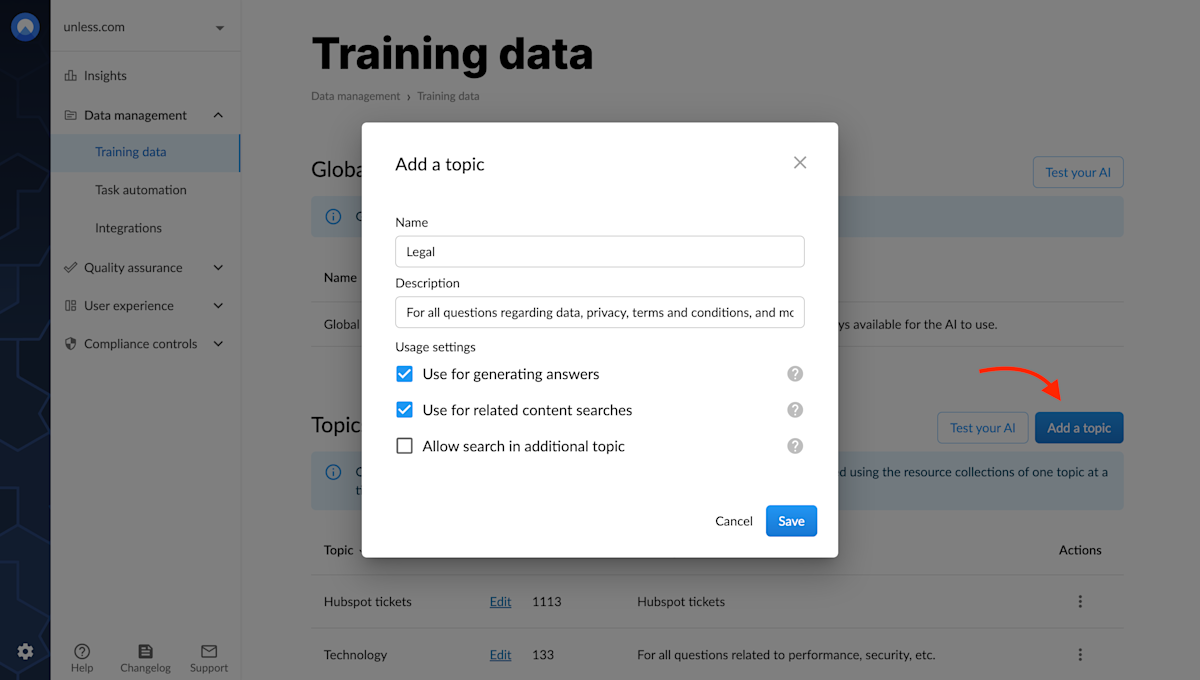
Adding a new topic

Once you’ve added a topic, you should be able to see it listed. Then, you can click Edit for that particular topic and add training sources as you normally would. Having added training data to your topic, it's time to test your AI on this topic.
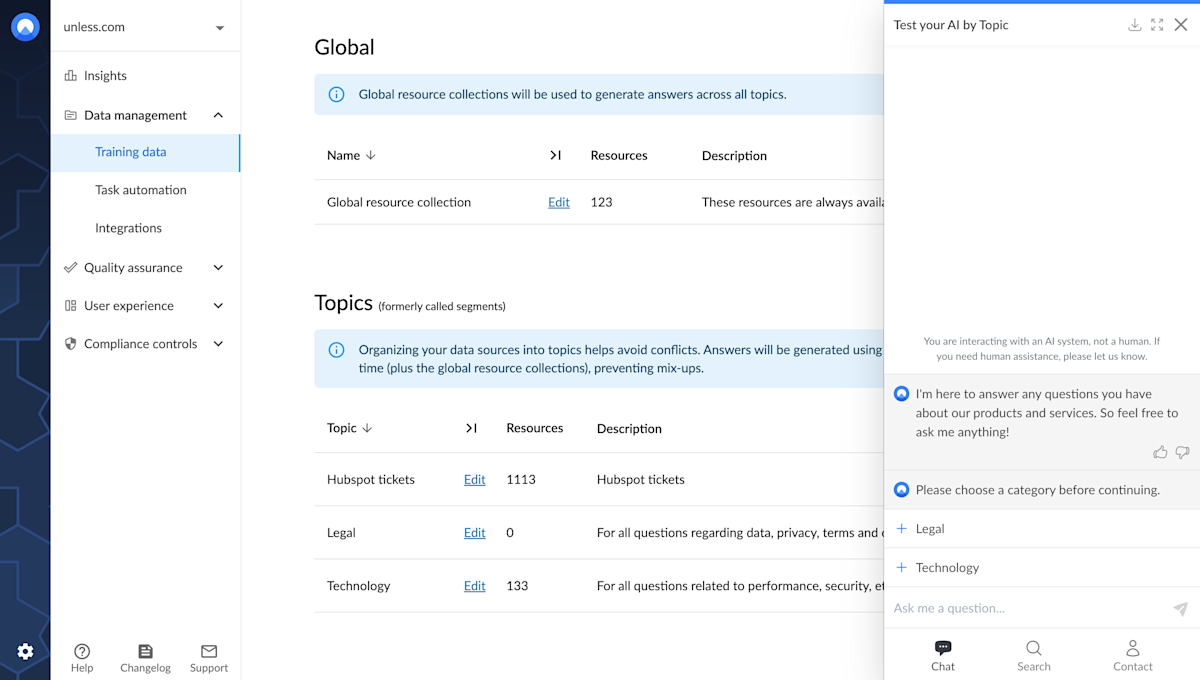
Testing your AI by topic

On the training data page, click the test your AI button in the topics section and select the topic you want to test the AI on. Keep in mind, in each topic, the AI will also search the global training sources.

Enabling a topic

Now that you have a topic (or more), the next step is to enable them for the components you want. When you are in the editor for an component, you can scroll down to the Other tab where you can switch on Expert mode.

This will enable more fields across the different tabs of the editor. You can then click open the PrimaryButton tab where you should see the Enable AI segment(s) dropdown. Here, the default will be None, meaning the global training sources will be used. However, you have the option to select one or more topics from the dropdown menu.
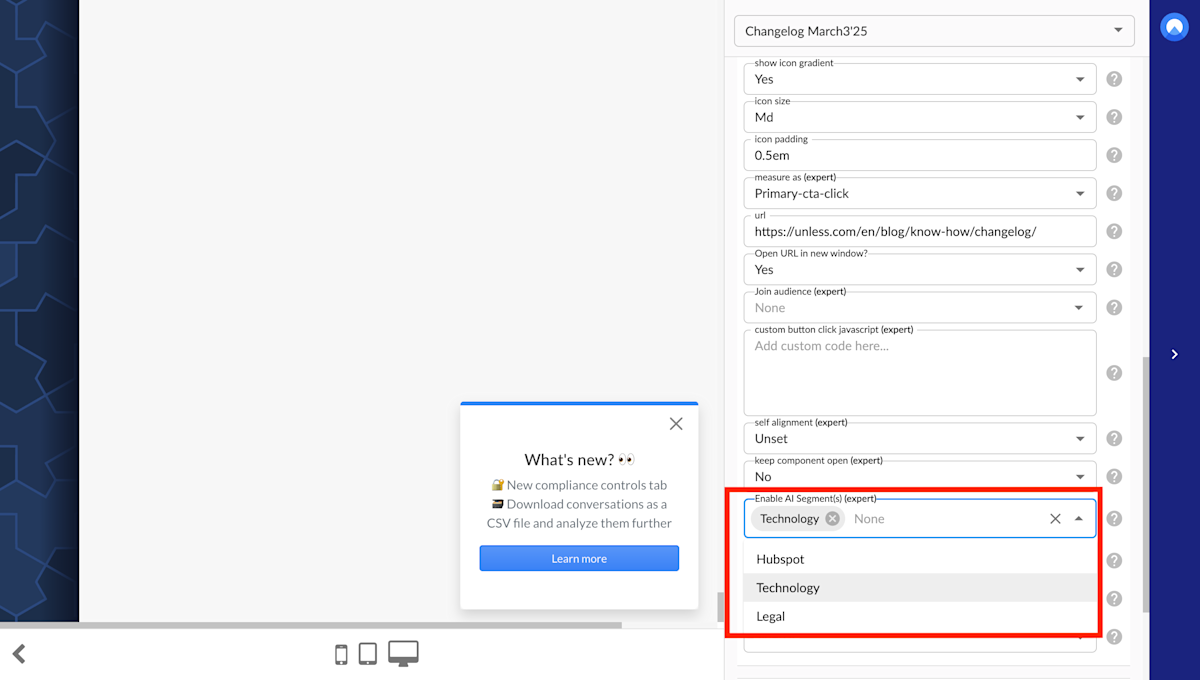
Enabling a topic via the component editor

If you select one topic here, that will directly be the topic that your end-users will be interacting with. If you select multiple topics, the end-user will first see the options and they can select one of the topics in which to have their conversation. You can think of this as similar to the self-segmentation feature we have for audiences.

Related content

We're here to help

Quick responses if you have an issue. Feel free to ask us anything — or ask our conversational AI a question.